The new year is upon us – so is the new aqua release with lots of great features!
In aqua 21.0, the focus is on collaboration. Especially in testing, the collaboration is facilitated by helpful functionalities and automatisms. In addition, the usability has been significantly increased and the range of functionalities of the interfaces has been expanded.
New: Screenshot functionality for test executions and in descriptions
With the new “Take screenshot” functionality, a screenshot can be taken directly from within aqua and can be edited in the browser. The screenshot can also be cropped and arrows, lines, highlights or text can be added and parts of the image can be blurred.
For more information, see the aqua wiki: https://aquawiki.andagon.com/versions/21.0/take_screenshot.html
New: Excel export of items in the web and improvements for the import
With the last release, Excel import was enabled in the web browser. In this release, all items can now also be exported from the web to Excel. Attachments and formatted descriptions including screenshots are also exported. This export can also be imported back into aqua in its entirety, including attachments and formatting.
For more information, see the aqua wiki: https://aquawiki.andagon.com/versions/21.0/export.html
New: Discussions in test cases and test scenarios
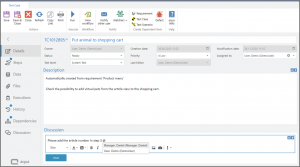
The popular discussion functionality within requirements has now been extended to test cases and test scenarios. For example, review comments, instructions or other remarks can be easily created within test cases and test scenarios and other users can also be addressed and automatically notified by e-mail via @.
New: Automatic transfer of field values between items
A new automatism requested by numerous users is now available with aqua 21.0. When creating items from within other items, field values can be taken over automatically.
For example, when creating a defect from a test execution, important information can be automatically transferred from the test case details to the defect details, e.g. the responsible department, the software module that was tested or the test level.
In the same way, values can also be transferred from an item when creating dependent items.
Values can be transferred from selection fields with shared value sets as well as from text fields. These simply need to be named the same in both items.
For more information, see the aqua wiki https://aquawiki.andagon.com/versions/21.0/taking_over_field_values_between_items.html
New: Drill-down functionality in the dashboard
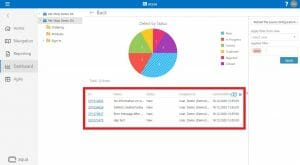
The dashboard now provides an even better overview of the projects current status and KPIs. Charts of the dashboard now show the items of the selected pie section or bar in the maximized view. From here, you can then jump directly to the respective items or to the navigation view with all the selected items.
For more information, see the aqua wiki:
https://aquawiki.andagon.com/versions/21.0/drilldown.html
New: Jira Sync improvements
Jira Sync has been enhanced in terms of usability and useful automatisms.
Now, for example, it is possible to configure that new field values in selection fields, that have been added in Jira, are also automatically added in the project configuration in aqua. This reduces the maintenance effort enormously, especially if fields are used that are very frequently updated, such as “Release” or “Version”.
In addition, the Sync Configurator has been extended with useful functions such as archiving of error messages, Excel export or direct links to Jira items. In addition, the sync status is now displayed in the respective items in aqua.
For more information, see the aqua wiki:
https://aquawiki.andagon.com/versions/21.0/map_field_values.html https://aquawiki.andagon.com/versions/21.0/work_with_the_syncconfigurator.html
New: User Management via the REST API
The REST API has been extended to include the user management. This allows you for example, to quickly create, modify or assign a large number of users via scripts.
The following REST API calls have been added and are described in detail on the REST API Help Page in the System section: Get licenses, Get all projects, Get all users, Create user, Get user, Delete user, Update user, Modify user, Assigne license, Modify license, Delete license assignment, Upload user picture
For more information, see the aqua wiki: https://aquawiki.andagon.com/versions/21.0/rest_api.html
New: Customization of the editor in description fields for better usability

Usability within items and their descriptions has been improved. Now the formatting editor is displayed within the description field at the bottom instead of appearing in the ribbon within a new tab. This keeps the ribbon, including the save buttons, directly accessible at all times, even when editing the description. The editor functions have also been extended to include the “take screenshot” functionality mentioned above.
Further improvements:
- Apply actions in field rules to text fields and number fields
- “Tested version last execution” selectable as field in the item browser
- Show the item ID in the email subject of Jira Sync error messages
- Copy and paste multiple test steps between test cases
- Edit existing images in descriptions
- Automatic access to discussions via the item navigation
- Darkmode
- Automatic update of variables in test steps when renaming them
- Improved keyboard control in dashboards
- Enhanced PowerShell agent with access to execution ID and test scenario information
aqua 21.0 has been released on January 4th, 2021.
Happy holidays and a happy new year from the entire aqua team!