3z91d189cd893f6dae72222264b6d2b45aab0fb7b98c7b4b6e4842f4ad15d8930f
Read our product guide to learn what features make aqua a money-saver for regulated industries
We use cookies to help you navigate efficiently and perform certain functions. You will find detailed information about all cookies under each consent category below.
The cookies that are categorised as "Necessary" are stored on your browser as they are essential for enabling the basic functionalities of the site. ...
Necessary cookies are required to enable the basic features of this site, such as providing secure log-in or adjusting your consent preferences. These cookies do not store any personally identifiable data.
Functional cookies help perform certain functionalities like sharing the content of the website on social media platforms, collecting feedback, and other third-party features.
Analytical cookies are used to understand how visitors interact with the website. These cookies help provide information on metrics such as the number of visitors, bounce rate, traffic source, etc.
Performance cookies are used to understand and analyse the key performance indexes of the website which helps in delivering a better user experience for the visitors.
Advertisement cookies are used to provide visitors with customised advertisements based on the pages you visited previously and to analyse the effectiveness of the ad campaigns.
Other uncategorised cookies are those that are being analysed and have not been classified into a category as yet.


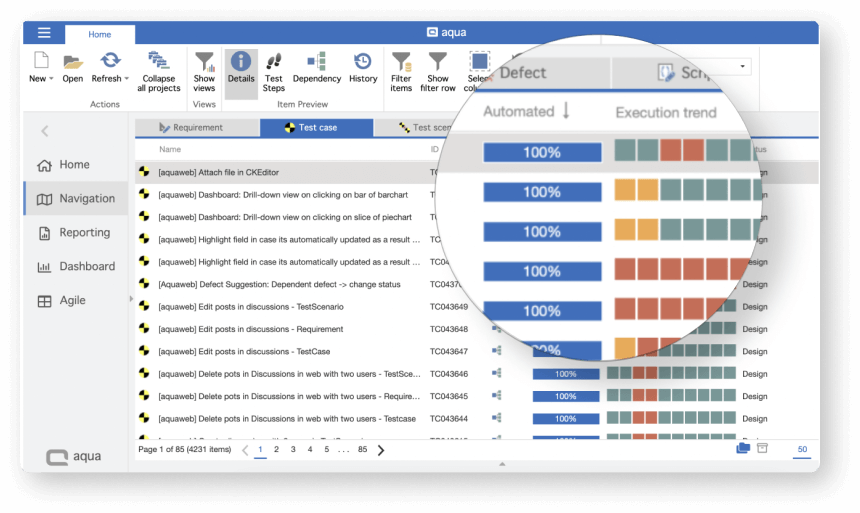
84% of users abandon applications after just two crashes. aqua's robust test management solution helps you schedule testing efforts to spot bugs and block application updates before issues are solved







A software development company in Germany struggled to continue releasing features every two weeks while keeping the app stable. The internal QA solution offered little continuity between tickets, which made issues slip.
aqua helped organise regression testing to improve the efficiency of QA specialists while reducing time spent on regression testing by 34%
Our work with the client started with a QA audit to identify the biggest bottlenecks in the workflow and the challenges behind them. Below are the initial findings

The QA team struggled to see if they are keeping up with QA tasks. Similarly, the team lead could not see if there is extra capacity for individual testers or the entire team.
Adding task overviews and planning visualisation to the internal QA tool would distract developers from the main product

For our client, QA often was the bottleneck for the features requested by the product owner and just implemented by the developers.
It was impossible to tell when QA clears the feature for production without nagging the QA lead all the time

Tracking issues locally blocked proper communication between fellow testers and the development team. Issues would get lost as somebody goes on vacation. Developers would not know they need to fix a particular bug.
The lack of written communication across reproducing and solving the bug led to redundant effort in tech product testing

Like most product companies, our client needed to run a lot of integration testing to ensure all components work properly. Pinpointing when exactly the app breaks is vital to isolate issues, too.
The internal QA tool lacked hierarchy-related functionality to keep up with all the integration testing scenarios

While new features breaking existing functionality is part of the process, our client could not afford it to happen on production.
The nature of the service meant that monthly subscribers would cancel their subscription over disruption
aqua helped the client ditch their outdated internal QA tool to optimise a wide range of testing procedures, make the process transparent and synchronise development
Open a requirement and auto-create an entire aqua test case covering it. Describe a test in plain words and get full test steps for it. Auto-prioritise your test cases to see which tests you absolutely must execute before deploying
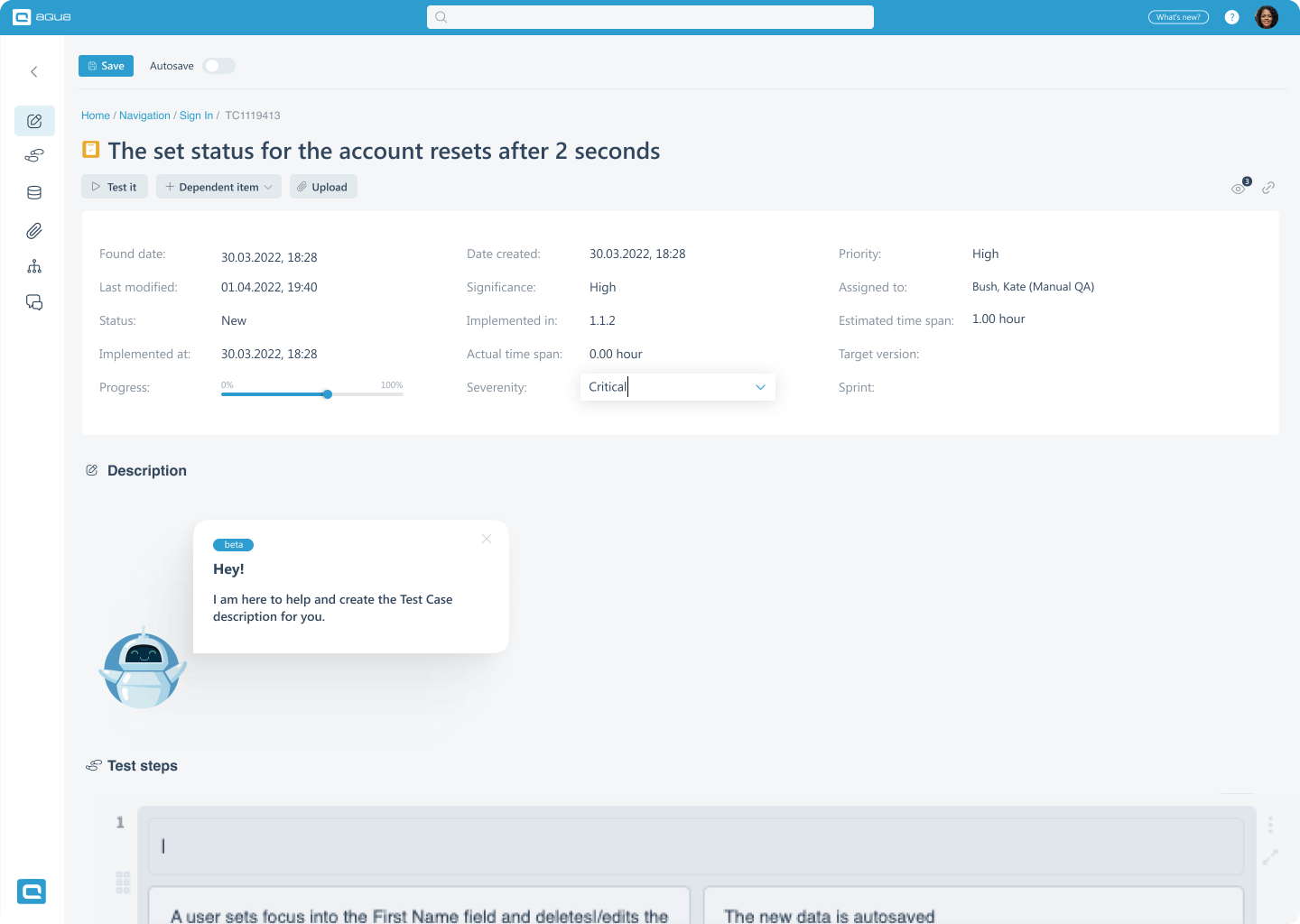
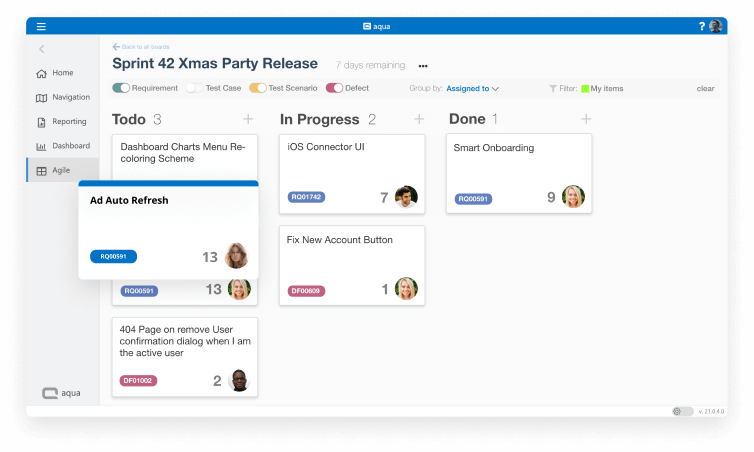
aqua allows you to run the QA effort just like modern companies run their development. Our software supports a Planning Board overviewing all tasks across sprints, Scrum Board to plan individual sprints, and Burn-Down Charts to see how your testers progress.
Both testers and their Lead can see where they stand and hold each other accountable to the scope of work and ability to meet it. aqua is a perfect tool for tech companies' new features testing
Increasing testing transparency is beneficial for non-QA employees, too. This is why aqua offers dashboard functionality providing a quick testing overview for anyone at the company. For example, Product Owner may notice an abnormal churn rate on iOS, confirm that it coincides with a spike in bugs of the iOS client, and ask Project Manager to escalate fixing them.
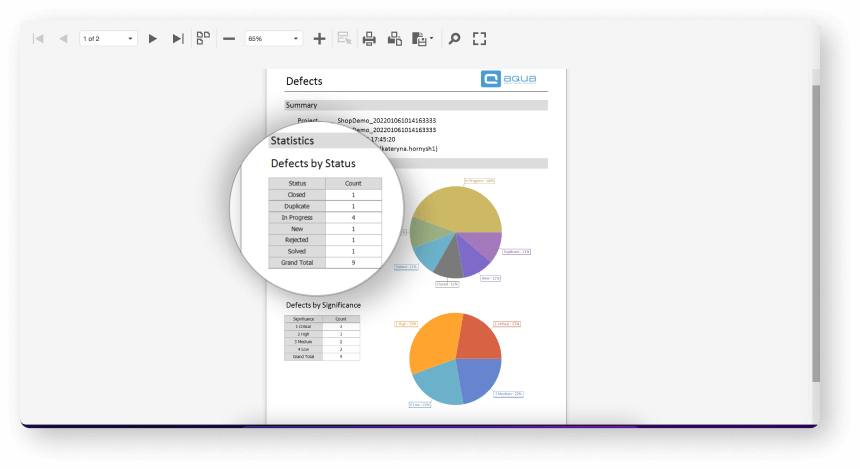
aqua’s reporting functionality requires even less effort to keep track of QA effort. You can use one of our templates or take time — once — to configure a custom report, schedule it to generate a new version every x days and automatically receive it in your inbox
Our software is packed with functionality that cultivates communication and helps you keep everything in writing. Each ticket has a comment section to discuss progress on reproducing bugs or adjusting a test case. Individual team members can be nudged to take a look at a particular item. Users can opt to receive notifications when a particular ticket changes status, e.g. a test case just failed. Software development has long been collaborative, and aqua does the same for testing in IT companies

aqua helps you organise all tickets to quickly find the relevant ones. You can distribute requirements, test cases, test scenarios, and bugs across multiple testing projects. They are further split into folders. This level of detail helps you run through essential tests first to quickly deploy a new feature or hotfix without breaking the product.
Your testers can also save time with our Views functionality. It is a preset of filters that can be configured once to display all tickets fitting certain criteria later. Once set up, it will take testers one click to see critical issues assigned to them, while the QA lead will easily browse all failed test scenarios.
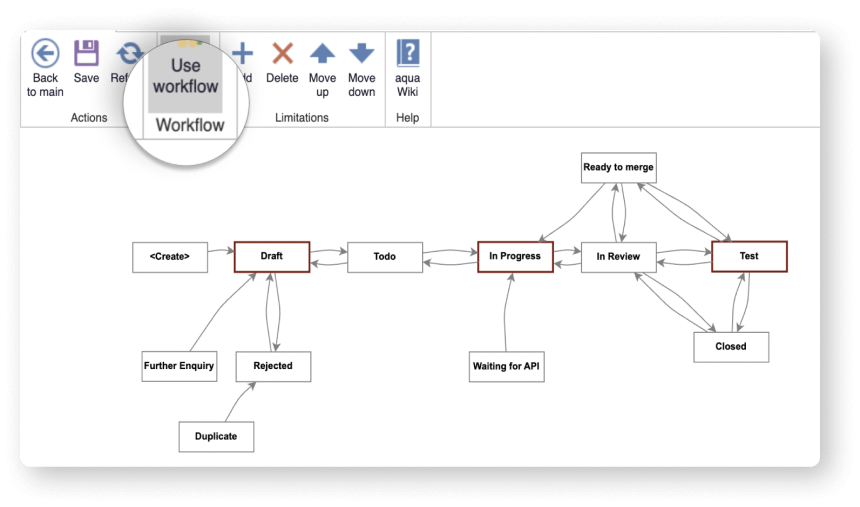
All items can also be bound by a workflow. For example, you can set up bugs to go the route of Create > New > In Progress > Solved > Closed <> Delivered. It is also possible to make certain fields mandatory when creating a ticket, e.g. they all must have priority, be assigned to someone and/or be placed into a certain sprint
Test scenarios are vital for regression testing, since it requires a thorough sweep of existing code. aqua’s test scenarios are dynamic, as they reference test cases instead of duplicating them once. It means that your regression (or any other) test scenarios are always up to date relative to changes in the test cases.
Dependencies block progression of a test scenario if some of the test case(s) have failed. This is how you avoid product-breaking issues making it into the live product: no update is pushed unless the essential test scenario(s) is all green

Open a requirement and auto-create an entire aqua test case covering it. Describe a test in plain words and get full test steps for it. Auto-prioritise your test cases to see which tests you absolutely must execute before deploying
aqua allows you to run the QA effort just like modern companies run their development. Our software supports a Planning Board overviewing all tasks across sprints, Scrum Board to plan individual sprints, and Burn-Down Charts to see how your testers progress.
Both testers and their Lead can see where they stand and hold each other accountable to the scope of work and ability to meet it. aqua is a perfect tool for tech companies' new features testing
Increasing testing transparency is beneficial for non-QA employees, too. This is why aqua offers dashboard functionality providing a quick testing overview for anyone at the company. For example, Product Owner may notice an abnormal churn rate on iOS, confirm that it coincides with a spike in bugs of the iOS client, and ask Project Manager to escalate fixing them.
aqua’s reporting functionality requires even less effort to keep track of QA effort. You can use one of our templates or take time — once — to configure a custom report, schedule it to generate a new version every x days and automatically receive it in your inbox
Our software is packed with functionality that cultivates communication and helps you keep everything in writing. Each ticket has a comment section to discuss progress on reproducing bugs or adjusting a test case. Individual team members can be nudged to take a look at a particular item. Users can opt to receive notifications when a particular ticket changes status, e.g. a test case just failed. Software development has long been collaborative, and aqua does the same for testing in IT companies
aqua helps you organise all tickets to quickly find the relevant ones. You can distribute requirements, test cases, test scenarios, and bugs across multiple testing projects. They are further split into folders. This level of detail helps you run through essential tests first to quickly deploy a new feature or hotfix without breaking the product.
Your testers can also save time with our Views functionality. It is a preset of filters that can be configured once to display all tickets fitting certain criteria later. Once set up, it will take testers one click to see critical issues assigned to them, while the QA lead will easily browse all failed test scenarios.
All items can also be bound by a workflow. For example, you can set up bugs to go the route of Create > New > In Progress > Solved > Closed <> Delivered. It is also possible to make certain fields mandatory when creating a ticket, e.g. they all must have priority, be assigned to someone and/or be placed into a certain sprint
Test scenarios are vital for regression testing, since it requires a thorough sweep of existing code. aqua’s test scenarios are dynamic, as they reference test cases instead of duplicating them once. It means that your regression (or any other) test scenarios are always up to date relative to changes in the test cases.
Dependencies block progression of a test scenario if some of the test case(s) have failed. This is how you avoid product-breaking issues making it into the live product: no update is pushed unless the essential test scenario(s) is all green
Many companies can track bugs and test their software development fine without a pro-tracking system. But aqua brings full traceability to your organisation and helps you to find answers to the most important questions in a matter of minutes:
01
Is this requirement tested at all/ tested enough?
02
Who did test that and how?
03
What did they do exactly to verify it works?
04
With what kind of data? User inputs?
05
What version have they tested, in which browser & OS?
06
Have the test cases been reviewed and possibly updated after the requirement changed?
07
What defects have been found? Have they been retested? How exactly have they been retested?
08
Who did change the requirement? What has been changed?

“At aqua, we've helped world's most innovative teams optimise their testing process for 20+ years already.”
Paul Elsner CSO at aqua
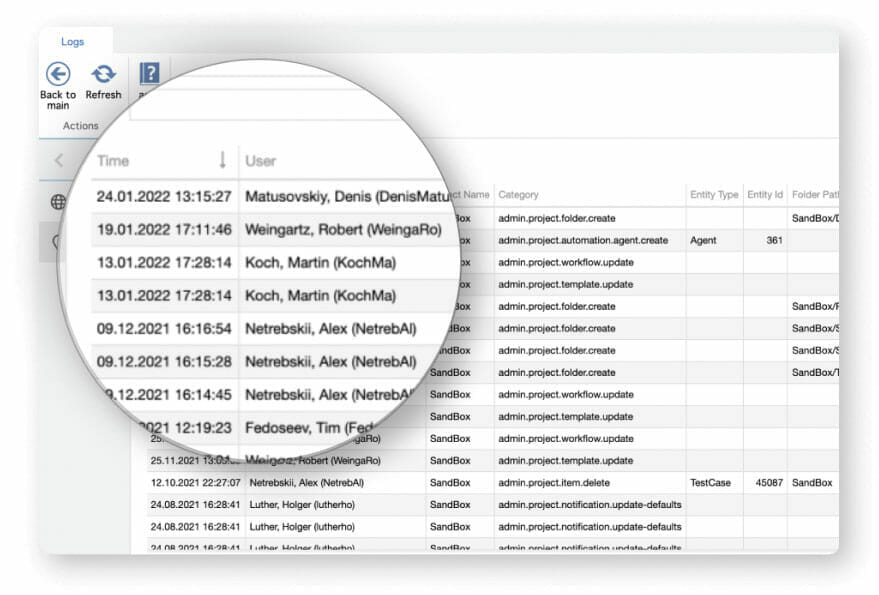
aqua can be the central hub for all your IT needs, separating ALM from pure testing tools. You can use aqua for requirements management, quality assurance, defect management — something that would usually take three separate tools. Things also move faster when your staff communicates in the same tool; you can spot bottlenecks easier by seeing if the feature/improvement/fix has been stuck for too long.
Another way to save costs is to bring QA into the development process early on. Thanks to aqua storing requirements, your testers can review them before passing them on to developers. This potentially saves dozens of man-hours, as you prevent extra work from QA and development that flawed requirements could have caused
It gets difficult to plan tests, keep track of test results, and resolve issues as your organisation gets bigger. This is how our IT product testing management tool helps your QA team stay organised and transparent:
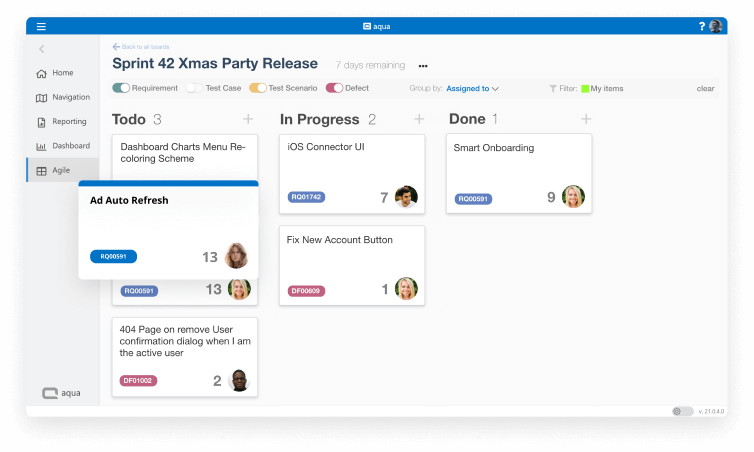
It’s no secret that product and service companies live and die by what they can fit into a sprint. Prioritising the right requirements & defects alongside effective planning of the sprint is how you make sure that developers and QAs will know what to work on and deliver the new functionality on time and hit the sprint goal.
It’s even better when you can visualise and track the progress together with the team.
aqua’s agile functionality is built on three scrum pillars:
Transparency
Inspection
Burndown chart to see how the team works, track if there are any deviations and predict whether the planned world will be delivered on time.
Adaptation
Refine the previous sprints, plan the new sprint based on what you learned through the work and progress
Our testing functionality helps you achieve 100% test coverage with as little redundant effort as possible. This way you make sure that essential tests are not ignored in the pre-release rush while potentially postponing others.
You can gradually balance the need for updating the app sooner vs. addressing all the new and lingering issues.
Here’s what makes testing with aqua smooth:
Once a hot debate, it’s clear now that a good balance of test automation and manual testing is beneficial to IT companies. Automating repetitive tests improves coverage by simultaneously verifying things work properly on all browsers and devices. There is no need to test these things one by one or try to find some tablet and an older Android phone that you lack for manual testing. Automated tests run in parallel and eliminate the need for obscure hardware.
Automation also gives your team more time. QA specialists can switch to exploratory testing, thus improving the defect detection rate. They will also have more time to create detailed bug reports, reducing the time it would take for developers to fix the issues. Developers, thanks to automated tests run alongside code deployment, can immediately see if something is wrong and try fixing it. These are man-hours that you save across the sprint.
aqua supports all major automation solutions (full list below) with out-of-the-box integrations. You can use REST API to link aqua with others
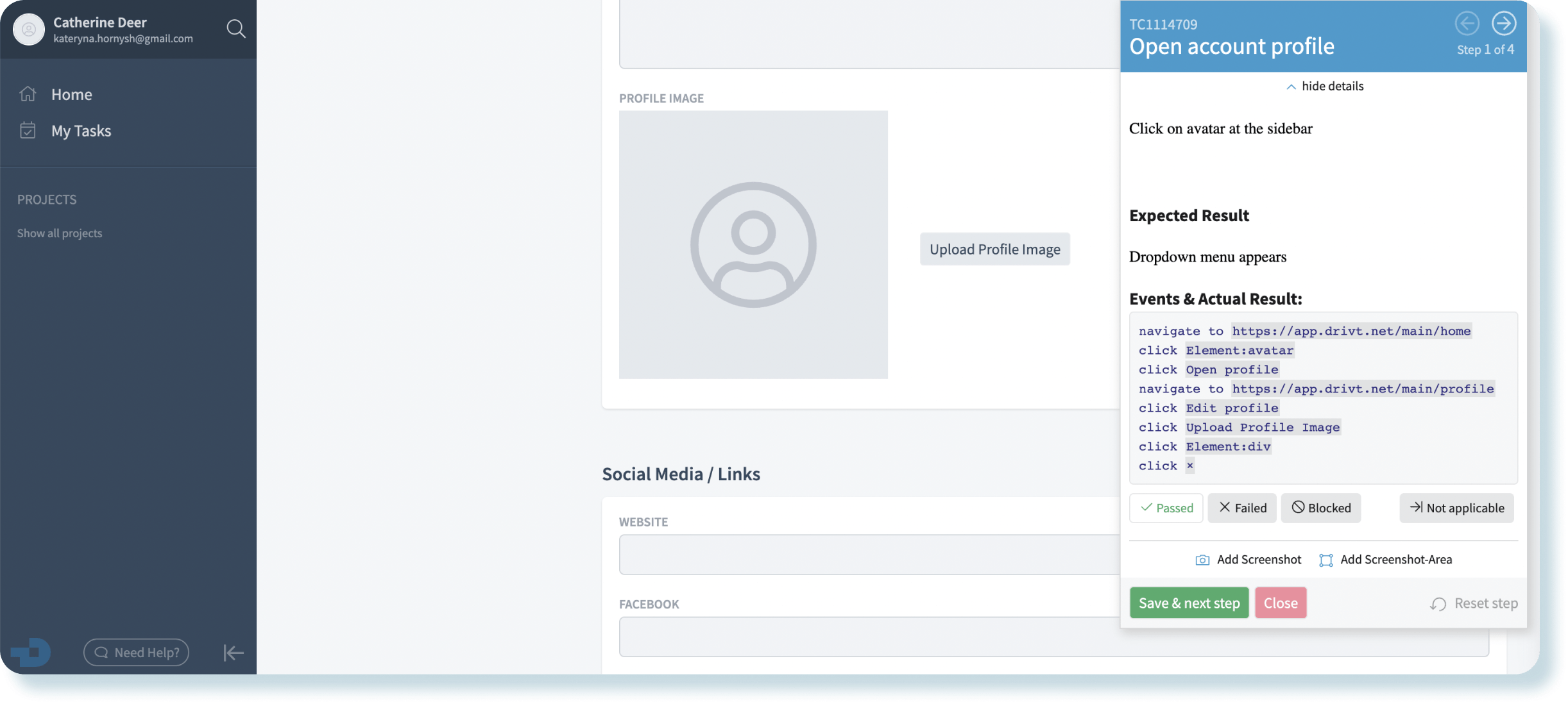
aqua Test Recorder is our Chrome extension that makes web testing a breeze. It removes the hassle and distraction of opening the test management solution every time your QA specialists need to file a bug report or run a test case.
Here’s what you can do with the extension:
The extension is available to all aqua users at no extra cost.
aqua integrates with all the most popular tools among testers:
Perform shell tests and utilize shell scripts no matter the OS
Automate testing for your web, mobile, and desktop software
Harness continuous integration and continuous delivery with industry’s leading automation server
Utilize a 20-year-old solution for automating functional and regression testing
Test web applications efficiently with Selenium’s simple web browser automation solution
Run load testing enhanced by dozens of third-party plugins
Automate database testing for databases powered by MSSQL
Nail manual and automated API testing
Automate database testing for databases powered by Database Oracle and MySQL
You can connect aqua with any tool that your company uses for testing or any other purposes. It doesn't matter if the other tool is too new or niche: REST API is a universal answer
Compared to other vendors, you don't need additional costly migration tools. aqua’s team has developed our own migration solution. It reads all data from your current software, converts it into suitable formats, then writes it to aqua, allowing to:

Migrate huge data
volumes
Fulfill explicit compliance
regulations

Ensure revision security
throughout the migration
Preserve expanded File history right after the migration is done
Merge the fields of your system with the fields and values of the aqua elements (requirement, test cases, and test scenarios)
Import the created file to aqua
Our migration tool converts all read-out data into a needed format and imports it right to aqua
Thanks to the intuitive, well-structured, and multilingual software interface, your testers master most of aqua’s functions after just a few hours

Companies that want to keep up with digital change trust in aqua

“Manual test cases are easily automated with aqua. Seamless integration with test automation tools helps here.”
“The possibility to design modular and parameterizable test cases leads to a very slim structure, enables a high reusability and accelerates the creation of new tests.”
“Manual test cases are easily automated with aqua. Seamless integration with test automation tools helps here.”
And if you have any questions, please email us.
Notifications