We use cookies and third-party services that store or retrieve information on the end device of our visitors. This data is processed and used to optimize our website and continuously improve it. We require your consent fro the storage, retrieval, and processing of this data. You can revoke your consent at any time by clicking on a link in the bottom section of our website. Privacy Policy.
Customise Consent Preferences
We use cookies to help you navigate efficiently and perform certain functions. You will find detailed information about all cookies under each consent category below.
The cookies that are categorised as "Necessary" are stored on your browser as they are essential for enabling the basic functionalities of the site. ...
Always Active
Necessary cookies are required to enable the basic features of this site, such as providing secure log-in or adjusting your consent preferences. These cookies do not store any personally identifiable data.
Cookie
gf_email_otp_seed_3
Duration
2 hours
Description
Used to temporarily store the OTP verification seed required for secure form or email verification.
Cookie
gf_email_otp_seed_12
Duration
2 hours
Description
Used to temporarily store the OTP verification seed required for secure form or email verification.
Cookie
gf_email_otp_seed_6
Duration
2 hours
Description
Used to temporarily store the OTP verification seed required for secure form or email verification.
Cookie
gf_email_otp_seed_1
Duration
2 hours
Description
Used to temporarily store the OTP verification seed required for secure form or email verification.
Cookie
gf_email_otp_seed_4
Duration
2 hours
Description
Used to temporarily store the OTP verification seed required for secure form or email verification.
Cookie
gf_email_otp_seed_10
Duration
2 hours
Description
Used to temporarily store the OTP verification seed required for secure form or email verification.
Cookie
gf_email_otp_seed_5
Duration
2 hours
Description
Used to temporarily store the OTP verification seed required for secure form or email verification.
Cookie
VISITOR_PRIVACY_METADATA
Duration
6 months
Description
YouTube sets this cookie to store the user's cookie consent state for the current domain.
Cookie
GAESA
Duration
1 month
Description
Description is currently not available.
Cookie
aquaSessionId2
Duration
2 days
Description
Description is currently not available.
Cookie
aquaXAuthId2
Duration
2 days
Description
Description is currently not available.
Cookie
rc::a
Duration
Never Expires
Description
This cookie is set by the Google recaptcha service to identify bots to protect the website against malicious spam attacks.
Cookie
rc::c
Duration
session
Description
This cookie is set by the Google recaptcha service to identify bots to protect the website against malicious spam attacks.
Cookie
__Secure-ENID
Duration
1 year 1 month
Description
The __Secure-ENID cookie is a type of secure cookie used for authentication and to ensure the security of user sessions.
Cookie
LS_CSRF_TOKEN
Duration
session
Description
Cloudflare sets this cookie to track users’ activities across multiple websites. It expires once the browser is closed.
Cookie
zalb_*
Duration
session
Description
Zoho sets this cookie for load balancing and session stickiness. It ensures that user requests are consistently directed to the same server during a session, helping maintain session integrity and improving website performance.
Cookie
GCLB
Duration
session
Description
This cookie is known as Google Cloud Load Balancer set by the provider Google. This cookie is used for external HTTPS load balancing of the cloud infrastructure with Google.
Cookie
cookieyes-*
Duration
1 year
Description
CookieYes sets this cookie for consent solution management.
Cookie
__cf_bm
Duration
1 hour
Description
This cookie, set by Cloudflare, is used to support Cloudflare Bot Management.
Functional cookies help perform certain functionalities like sharing the content of the website on social media platforms, collecting feedback, and other third-party features.
Cookie
VISITOR_INFO1_LIVE
Duration
6 months
Description
A cookie set by YouTube to measure bandwidth that determines whether the user gets the new or old player interface.
Cookie
ytidb::LAST_RESULT_ENTRY_KEY
Duration
Never Expires
Description
The cookie ytidb::LAST_RESULT_ENTRY_KEY is used by YouTube to store the last search result entry that was clicked by the user. This information is used to improve the user experience by providing more relevant search results in the future.
Cookie
__session
Duration
1 year 1 month 4 days
Description
GitBook sets this cookie for logging in.
Cookie
uesign
Duration
1 month
Description
Zoho sets this cookie for the Visitor Live Chat.
Cookie
_tldtest_*
Duration
session
Description
Amplitude sets this cookie to determine the highest-level domain where cookies can be set. Deleted after testing.
Cookie
lidc
Duration
1 day
Description
LinkedIn sets the lidc cookie to facilitate data center selection.
Cookie
li_gc
Duration
6 months
Description
Linkedin set this cookie for storing visitor's consent regarding using cookies for non-essential purposes.
Analytical cookies are used to understand how visitors interact with the website. These cookies help provide information on metrics such as the number of visitors, bounce rate, traffic source, etc.
Cookie
gf_visitor_source
Duration
7 days
Description
Stores visitor attribution data such as source, medium, campaign, content, term, and location for analytics and lead attribution.
Cookie
gf_visitor_medium
Duration
7 days
Description
Stores visitor attribution data such as source, medium, campaign, content, term, and location for analytics and lead attribution.
Cookie
gf_visitor_campaign
Duration
7 days
Description
Stores visitor attribution data such as source, medium, campaign, content, term, and location for analytics and lead attribution.
Cookie
gf_visitor_content
Duration
7 days
Description
Stores visitor attribution data such as source, medium, campaign, content, term, and location for analytics and lead attribution.
Cookie
gf_visitor_term
Duration
7 days
Description
Stores visitor attribution data such as source, medium, campaign, content, term, and location for analytics and lead attribution.
Cookie
gf_visitor_location
Duration
7 days
Description
Stores visitor attribution data such as source, medium, campaign, content, term, and location for analytics and lead attribution.
Cookie
ga_session_duration
Duration
1 hour
Description
Stores visitor attribution data such as source, medium, campaign, content, term, and location for analytics and lead attribution.
Cookie
_ga_*
Duration
1 year 1 month 4 days
Description
Google Analytics sets this cookie to store and count page views.
Cookie
_ga
Duration
1 year 1 month 4 days
Description
Google Analytics sets this cookie to calculate visitor, session and campaign data and track site usage for the site's analytics report. The cookie stores information anonymously and assigns a randomly generated number to recognise unique visitors.
Cookie
amp_*
Duration
1 year
Description
Amplitude sets this cookie for session tracking for analytics purposes.
Cookie
YSC
Duration
session
Description
YSC cookie is set by Youtube and is used to track the views of embedded videos on Youtube pages.
Cookie
amplitude_device_id
Duration
session
Description
No description available.
Cookie
loom_anon_comment
Duration
1 year
Description
No description available.
Cookie
loom_referral_video
Duration
session
Description
Description is currently not available.
Cookie
__Host-psifi.analyticsTrace
Duration
6 hours
Description
Description is currently not available.
Cookie
__Host-psifi.analyticsTraceV2
Duration
6 hours
Description
Description is currently not available.
Cookie
_cs_id
Duration
1 year 1 month
Description
This cookie is used to store the ContentSquare's user identifier ID. This is a persistent cookie and expires after 13 months.
Cookie
_cs_s
Duration
1 hour
Description
This cookie is used to store the number of page's viewed by a visitor within the session for ContentSquare's solution.
Cookie
ai_session
Duration
1 hour
Description
This is a unique anonymous session identifier cookie set by Microsoft Application Insights software to gather statistical usage and telemetry data for apps built on the Azure cloud platform.
Cookie
_hjSessionUser_*
Duration
1 year
Description
Hotjar sets this cookie to ensure data from subsequent visits to the same site is attributed to the same user ID, which persists in the Hotjar User ID, which is unique to that site.
Cookie
_hjSession_*
Duration
1 hour
Description
Hotjar sets this cookie to ensure data from subsequent visits to the same site is attributed to the same user ID, which persists in the Hotjar User ID, which is unique to that site.
Cookie
ajs_anonymous_id
Duration
1 year
Description
This cookie is set by Segment to count the number of people who visit a certain site by tracking if they have visited before.
Cookie
_cs_c
Duration
1 year 1 month
Description
This cookie is used by Contentsquare to store the user's consent preference for analytics and session replay tracking.
Cookie
utm_medium
Duration
7 days
Description
This cookie is used to record from where the visitor came to the website orginally. This information is used by the website operator to know the efficiency of their marketing.
Cookie
utm_source
Duration
7 days
Description
This cookie is used to record from where the visitor came to the website orginally. This information is used by the website operator to know the efficiency of their marketing.
Cookie
utm_campaign
Duration
7 days
Description
Google Ad Services sets this cookie to store session campaign value if present.
Cookie
utm_content
Duration
7 days
Description
This cookie is used for storing the session content value if present.
Cookie
utm_term
Duration
7 days
Description
This cookie is used to record from where the visitor came to the website orginally. This information is used by the website operator to know the efficiency of their marketing.
Cookie
amp_cookie_test*
Duration
session
Description
Amplitude sets this cookie to test if cookies are enabled in the user’s browser. It is used during SDK initialisation and is automatically removed after the check.
Cookie
utsdb
Duration
session
Description
Zoho SalesIQ sets this cookie to register data on visitor's website behaviour.
Performance cookies are used to understand and analyse the key performance indexes of the website which helps in delivering a better user experience for the visitors.
Cookie
_uetsid
Duration
1 day
Description
Bing Ads sets this cookie to engage with a user that has previously visited the website.
Cookie
_uetvid
Duration
1 year 24 days
Description
Bing Ads sets this cookie to engage with a user that has previously visited the website.
Advertisement cookies are used to provide visitors with customised advertisements based on the pages you visited previously and to analyse the effectiveness of the ad campaigns.
Cookie
_gcl_au
Duration
3 months
Description
Google Tag Manager sets this cookie to experiment advertisement efficiency of websites using their services.
Cookie
__Secure-ROLLOUT_TOKEN
Duration
6 months
Description
YouTube sets this cookie to manage feature rollout and experimentation. It helps Google control which new features or interface changes are shown to users as part of testing and staged rollouts, ensuring consistent experience for a given user during an experiment.
Cookie
__Secure-YEC
Duration
past
Description
Description is currently not available.
Cookie
__Secure-YNID
Duration
6 months
Description
YouTube cookie used to protect user security and prevent fraud, especially during the login process.
Cookie
test_cookie
Duration
15 minutes
Description
doubleclick.net sets this cookie to determine if the user's browser supports cookies.
Cookie
MUID
Duration
1 year 24 days
Description
Bing sets this cookie to recognise unique web browsers visiting Microsoft sites. This cookie is used for advertising, site analytics, and other operations.
Cookie
ai_user
Duration
1 year
Description
Microsoft Azure sets this cookie as a unique user identifier cookie, enabling counting of the number of users accessing the application over time.
Cookie
NID
Duration
6 months
Description
Google sets the cookie for advertising purposes; to limit the number of times the user sees an ad, to unwanted mute ads, and to measure the effectiveness of ads.
Cookie
__Host-GAPS
Duration
2 years
Description
This cookie allows the website to identify a user and provide enhanced functionality and personalisation.
Cookie
bcookie
Duration
1 year
Description
LinkedIn sets this cookie from LinkedIn share buttons and ad tags to recognize browser IDs.
Cookie
IDE
Duration
1 year 24 days 1 minute
Description
Google DoubleClick IDE cookies store information about how the user uses the website to present them with relevant ads according to the user profile.
Cookie
guest_id_marketing
Duration
1 year 1 month 4 days
Description
Twitter sets this cookie to identify and track the website visitor.
Cookie
guest_id_ads
Duration
1 year 1 month 4 days
Description
Twitter sets this cookie to identify and track the website visitor.
Cookie
personalization_id
Duration
1 year 1 month 4 days
Description
Twitter sets this cookie to integrate and share features for social media and also store information about how the user uses the website, for tracking and targeting.
Cookie
guest_id
Duration
1 year 1 month 4 days
Description
Twitter sets this cookie to identify and track the website visitor. It registers if a user is signed in to the Twitter platform and collects information about ad preferences.
Other uncategorised cookies are those that are being analysed and have not been classified into a category as yet.
Cookie
_cs_root-domain
Duration
session
Description
Description is currently not available.
Cookie
aquacloudio-_zldp
Duration
1 year 1 month 4 days
Description
Description is currently not available.
Cookie
aquacloudio-_zldt
Duration
1 year 1 month 4 days
Description
Description is currently not available.
Cookie
amplitude_testaqua-cloud.io
Duration
1 year
Description
Description is currently not available.
X
🤖 Exciting new updates to aqua Intelligence are now available! 🎉
18 Chrome Extensions Every Developer and Tester Needs
Hey, developers and testers out there! We know what's bugging you daily: navigating complex codebases, optimising workflows, and staying up-to-date with the latest technologies. That's why we're here to lend a helping hand. Sometimes this overwhelming job can require 120% effort from you, so we bring you a handpicked selection of 18 game-changing Chrome extensions.
Almost everyone working with browsers needs extensions to streamline their work. In this manner, developers especially need them for specific challenges. Let’s look at some of them:
Debugging: Debugging is easier with extensions like React Developer Tools (which we discuss later in this article). They allow you to inspect components, view their state, and identify issues instantly. Why does this matter? Because you can troubleshoot without digging through endless console logs or adding extra code to track changes.
API Testing: Some extensions let you test APIs right from your browser. You can send requests, review responses, and adjust your endpoints on the spot. This is especially useful when debugging API integrations or verifying backend updates quickly.
Browser Customisation: Testing often requires tweaking browser behaviour, and browser extensions make it simple. You can modify HTTP headers or switch user agents to simulate different devices. This is handy when replicating real-world conditions for testing.
Quick Design Tweaks: Small design adjustments can be handled with some extensions (like ColorZilla and Stylebot). You can pick colours directly from a webpage or edit CSS live to see how changes look. Why is this helpful? It saves you from jumping back and forth between your code editor and the browser.
Now it’s time to move on to the list of tools that can be life-saver or at least side helpers for devs.
This list of the best Chrome extensions for developers is meticulously curated to enhance your productivity and, most importantly, save you a great deal of time. So if you are a back-end, front-end, or one-man-army web developer, fasten your seatbelts, and let’s go!
"Every great developer you know got there by solving problems they were unqualified to solve until they actually did it."
Patrick McKenzie, Founder at Kalzumeus Software
1. Capture
Chrome rating: 5/5
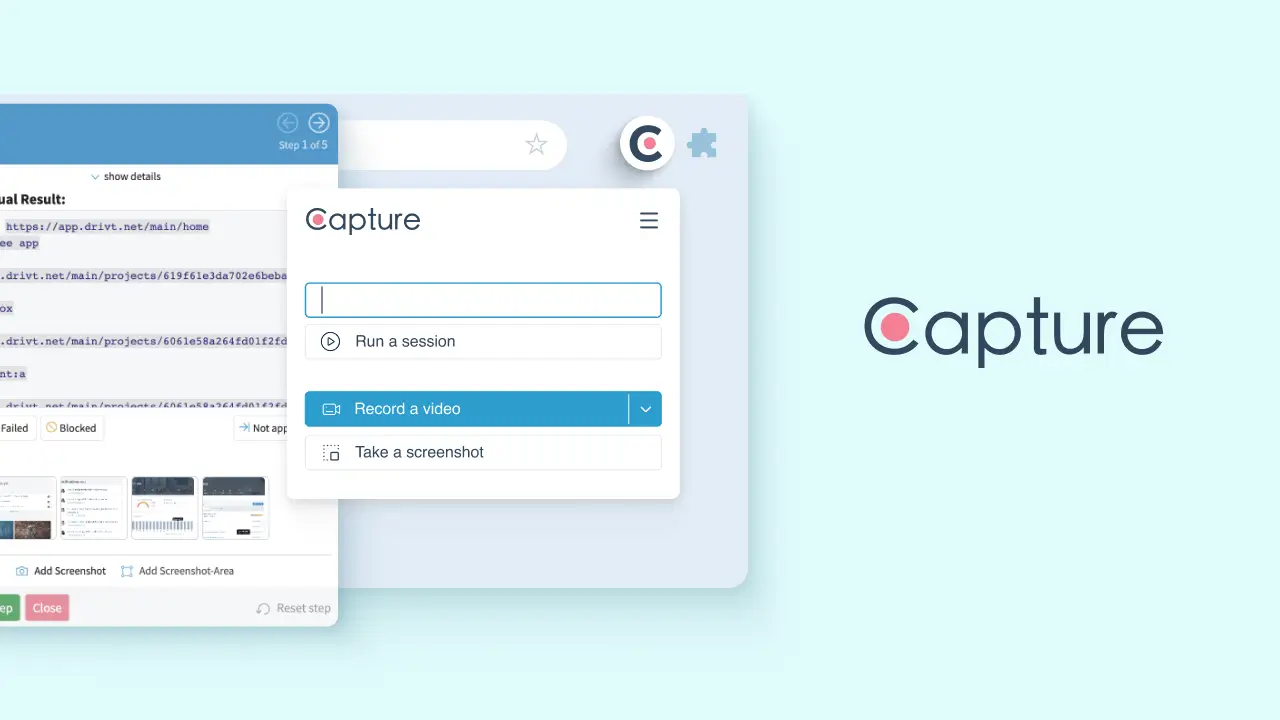
Capture is the first Chrome extension we advise you to add to your browser for several reasons. With Capture, recording interactions on web pages becomes much easier. It automatically captures all your actions within each test step, generating a timestamped video of your test execution. This video and the transcript of actions allow you to reproduce defects quickly and gain a clear understanding of the reported issues.
It also offers versatile capturing options, including desktop capture, window recording, or in-app screencasting. Capture works even better when everyone on the team uses it. A timestamped video of discovered defects from the testers helps you understand the issue promptly, accelerating the troubleshooting process.
Capture automatically saves crucial information about the operating system, browser version, and window resolution used during the test as well. You can also take full or partial screenshots directly within the browser and annotate them on the spot.
This must-have Chrome extension for web developers also empowers teams with comprehensive test documentation by providing annotated screenshots, timestamped videos, and a log of all tester inputs. As a company, you will save yourself quite a bit of stress that independent and government QA audits often carry.
Additionally, Capture integrates with one of the most popular bug-reporting tools— aqua cloud. With this integration, you can create a test case from scratch, start a test run, and report the captured data directly to the tool.
Elevate your web development and testing process with Capture, the must-have Chrome extension for developers and testers. Capture simplifies recording interactions on web pages, ensuring you never miss a detail. Its automatic timestamped videos and detailed action transcripts help you quickly reproduce defects and understand reported issues, accelerating troubleshooting and enhancing collaboration. With versatile capturing options and comprehensive test documentation, including annotated screenshots and logs of tester inputs, Capture streamlines your workflow and improves accuracy. Integrate seamlessly with aqua cloud or directly with Jira to efficiently manage and report your test data. Experience stress-free QA audits and boost your team’s productivity with Capture today!
While not a Chrome extension, aqua cloud is an indispensable test management solution for developers and testers, designed to enhance your entire testing ecosystem. Although Capture is a free standalone tool, it integrates seamlessly with aqua cloud, transforming your bug reports into part of a cohesive testing process. So what does aqua cloud do?
aqua offers unparalleled visibility and structure for your testing efforts, seamlessly uniting automated and manual testing. It uses powerful AI capabilities to streamline workflows and optimise efficiency.
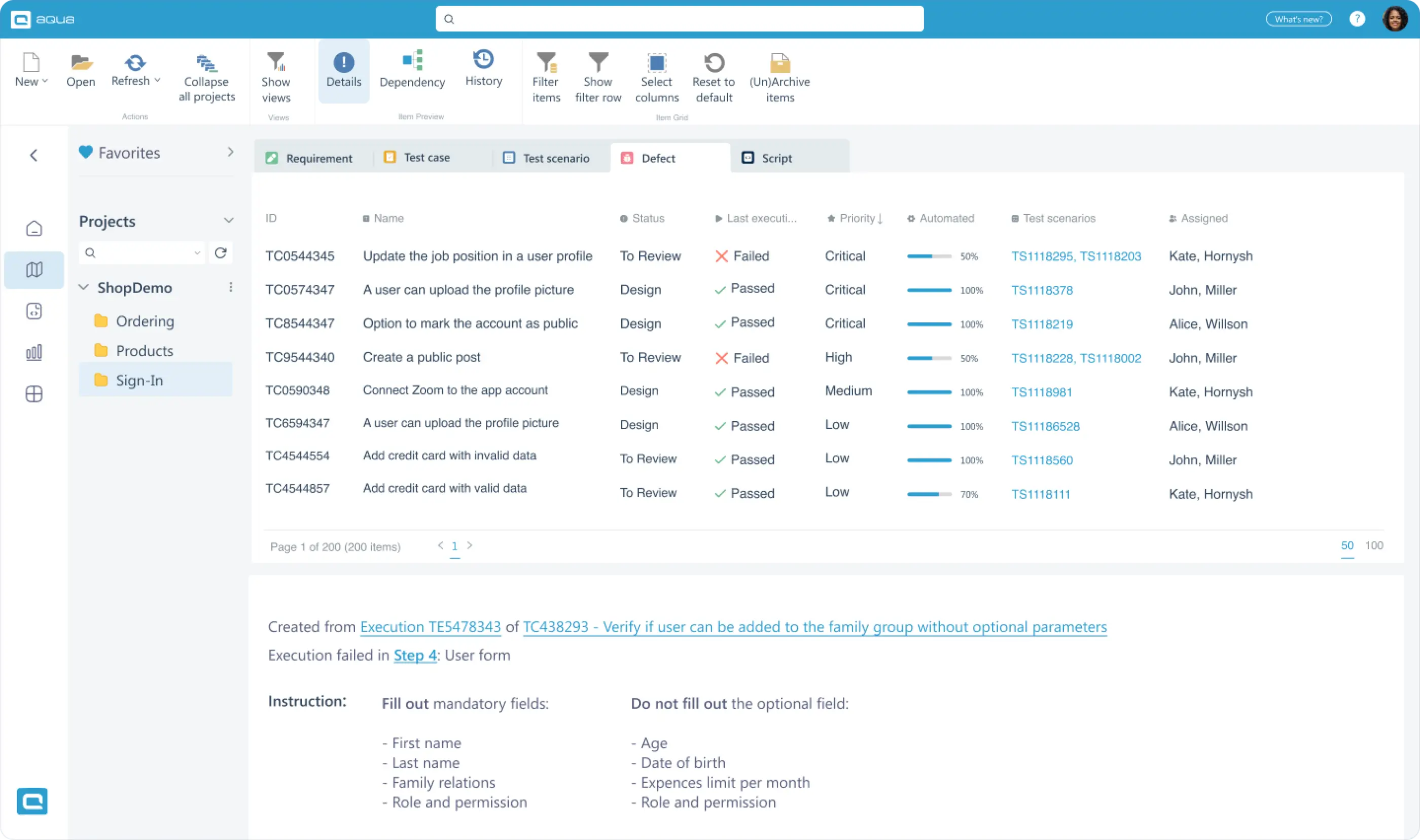
As a test management solution, aqua cloud lets you control your test coverage and update the QA scope in seconds. With its requirements view, you can easily identify requirements not covered by tests and check if existing test cases are up-to-date with just one click. aqua’s AI Copilot saves you hours by creating missing tests and covering more edge cases quickly, making it the best tool for high-volume projects. By keeping all tests in a single solution, aqua boosts synergy, allowing you to run tests directly or integrate with tools like Selenium, JMeter, and Ranorex.
For user acceptance testing, aqua cloud maximises the usage of AI to streamline the process. You can open a requirement and auto-create comprehensive test cases, describe tests in plain words and prioritise test cases to ensure critical tests are executed before deployment. Dashboards with KPI alerts track product maturity, and you can grant end-user testers free licenses to run scenarios and report defects, limiting their access to specific projects or folders as needed.
As a bug tracking tool, aqua cloud integrates seamlessly with a tool called Capture. Capture enhances this by providing 100% visual bug reports with timestamped videos and environment information, streamlining defect reporting. Customisable defect templates ensure all relevant information is included, making bug tracking efficient and thorough.
For requirements management, aqua cloud goes beyond traditional methods by leveraging AI-powered tools to create comprehensive requirements, PRDs, and User Stories. With its Dependencies functionality, aqua cloud allows you to meticulously define how one item relates to another—whether verifying, duplicating, or depending on others—thereby fostering a structured and organized testing culture. Additionally, aqua cloud enables you to establish governance workflows that automatically enforce item status changes, required fields, and transition restrictions. This cohesive framework ensures all mandatory item fields are completed, maintaining a streamlined and controlled testing process. By integrating AI into requirements management, aqua cloud makes your test management more efficient and effective, ensuring thorough coverage and alignment with business objectives.
Elevate your testing process with the powerful combination of Capture and aqua cloud. While both are robust standalone solutions, you get the best out of Capture when it is integrated with aqua cloud. This integration creates the best duo of tools for developers and testers on the market. Leverage the power of AI Copilot to create detailed test cases in seconds from simple words or voice prompts. Enjoy comprehensive requirements management and maintain 100% traceability throughout your testing lifecycle. Streamline your workflow, save time, and ensure accuracy with aqua cloud’s cutting-edge AI and seamless integration with Capture. Transform your QA and development process and boost your team’s efficiency today!
Have much more than just Chrome extension - elevate 100% of your QA process
CSSViewer is the second Chrome extension for developers on our list, and it allows you to inspect and extract CSS properties from any element on a web page. With CSSViewer, you can easily identify and analyse the CSS styles applied to specific elements by hovering over them. It displays the computed CSS properties, including colour, font, padding, margin, and more, providing you with a quick overview of the styling rules applied to a selected element.
CSSViewer streamlines inspecting and understanding CSS styles, making it convenient for you to troubleshoot styling issues, debug layout problems, and ensure consistency in web designs.
4. Bug Magnet
Bug Magnet is a handy Chrome extension for testers to quickly discover and report bugs. It provides a context menu for input fields with various pre-defined values and patterns, helping testers perform exploratory testing more efficiently.
Pre-defined input values allow testers to quickly fill input fields with common test cases, including edge cases like long strings, special characters, HTML tags, and SQL injection patterns. Testers can also add their own custom values to the context menu for more personalised testing scenarios. The extension is integrated into the right-click context menu for ease of use and offers configurable categories to suit different testing needs.
Bug Magnet saves time by providing quick access to a wide range of test inputs, allowing testers to focus on finding and reporting bugs rather than manually creating test data. The extension helps testers cover a broad range of test scenarios, including edge cases that are often overlooked, thereby increasing the likelihood of identifying potential issues. The integration with the context menu makes it easy to use without interrupting the testing flow, providing a seamless and intuitive experience. The ability to add custom values and configure categories ensures that Bug Magnet can be tailored to meet the specific needs of any testing project.
5. Octotree
Chrome rating: 4.8/5
Octotree is another top Chrome extension for developers that provides a tree-style code navigation sidebar for GitHub repositories. It helps developers simplify code exploration on GitHub by organising the repository’s files and folders in a collapsible tree structure.
Octotree enhances your code browsing experience on GitHub repositories by providing easy navigation through codebases, seamless switching between files and directories, and quick access to code snippets by eliminating repetitive page navigation. It significantly improves productivity, particularly for larger projects with extensive directory structures, enabling efficient exploration of complex codebases.
6. CheckBot
Moving on through our list, we bring you another Chrome extension for testers. Checkbot is a robust Chrome extension designed to streamline website testing and auditing processes. It automates checks for SEO, speed, security, and accessibility issues, delivering comprehensive reports and actionable insights directly within the browser.
Checkbot offers features such as SEO analysis for on-page factors like meta tags and keywords, speed tests to identify slow-loading pages, security scans for vulnerabilities, and accessibility audits to ensure compliance with WCAG guidelines. This extension enhances testing efficiency by automating critical checks and providing detailed reports, enabling testers and developers to optimize website performance, security, and user accessibility effectively.
Now that you’ve seen the list of extensions, here comes the real challenge: which ones should you actually install? With browser performance on the line, you can’t just add them all. Use our interactive tool below to build your ideal extension stack based on your role and discover which combinations work best (and which might slow you down).
7. React Developer Tools
Chrome rating: 4.1/5
The next useful Chrome extension for developers is React Developer Tools, which enhances Chrome Developer Tools by providing additional features specifically tailored for React applications.
This extension will help you with the following:
Inspect the React component hierarchy
Monitor component props and state
Debug React applications more effectively
The extension allows you to analyse each React component’s structure and behaviour, examine the props and state values, and observe the changes through the component tree. React Developer Tools also provides invaluable insights for debugging, optimising performance, and understanding the React architecture of your applications.
🎯 Build Your Perfect Extension Stack (Click to open)
▼
📋 Your Mission:
You're setting up a new development machine and need to choose your extension stack wisely. With only 6 extension slots available (to keep your browser fast), you must build a strategic toolkit that matches your workflow. Some extensions work beautifully together, others overlap in functionality, and a few might even conflict. Choose carefully - every slot counts!
👤 Select Your Role:
📦 Available Extensions
Select a role to begin
⚡ Your Stack (Max 6)
🚀 Browser Performance Impact0%
📊 Your Extension Choices Analyzed:
8. Wave evaluation tool
The WAVE Evaluation Tool is a Chrome extension designed to assist testers and developers in evaluating the accessibility of web content. It provides visual feedback and detailed reports on accessibility issues based on WCAG guidelines directly within the browser.
The WAVE Evaluation Tool identifies accessibility barriers on web pages, highlights elements with accessibility errors directly on the page, and generates comprehensive reports outlining detected accessibility violations and offering suggestions for remediation. Users can customize settings for different accessibility standards and preferences to suit their testing needs.
This extension enhances testing accuracy by providing real-time feedback and detailed reports, empowering testers and developers to identify and resolve accessibility issues efficiently and ensure web content is inclusive and compliant with regulatory standards.
Although the abovementioned extensions are great for testers and devs, nothing streamlines the testing process quite like aqua cloud. With advanced features for comprehensive test management, aqua ensures efficient test case creation, and thorough requirement coverage, and leverages AI with its Copilot to automate test generation and optimise workflows.
9. Lighthouse
Chrome rating: 4.4/5
Developed by Google, Lighthouse is a powerful extension that helps you audit web pages for:
Performance
Accessibility
Best practices
SEO
Lighthouse allows you to run an automated analysis of a web page and receive a detailed report with suggestions for improvement. It monitors different aspects of a web page, like performance metrics, accessibility standards, and adherence to best practices.
This extension provides actionable insights and recommendations to optimise your website’s performance, enhance accessibility, and improve its overall quality and visibility. As your website grows, keeping track of the complicated metrics over time becomes much harder, so Lighthouse might be your best choice. Whether you run ads or count on organic traffic, getting recommendations for better Google ranking straight from Google is invaluable.
10. JSON Viewer
Chrome rating: 4.6/5
JSON Viewer is a helpful extension that allows you to view and format JSON documents more comfortably. With this extension, you can present JSON responses from APIs or raw JSON data files in a structured and organised format, making it easier to understand and analyse.
JSON Viewer also provides the following:
Syntax highlighting
Collapsible sections
Indentation
These features allow you to easily navigate and explore complex JSON structures, enhancing readability and facilitating debugging and data analysis tasks.
11. Postman
Chrome rating: 4.7/5
One of the most popular and best Google Chrome extensions for developers is Postman, a popular API development and testing tool that simplifies sending HTTP requests and analysing responses. With this extension, you can easily create and send requests like GET, POST, PUT, and DELETE to test APIs.
It provides a user-friendly interface for adding:
Request headers
Query parameters
Request bodies
Authentication credentials
With Postman, you can save and organise your API requests in collections, making management smoother. Its comprehensive testing capabilities help you validate API responses, debug issues, and streamline your web application development and testing.
No integration is more valuable than Capture + aqua for both testers and devs. Capture enhances aqua’s capabilities by providing detailed bug reports with timestamped videos and environment information, streamlining defect reporting and ensuring precise issue identification. Together, Capture and aqua Cloud create a powerful toolkit that enhances productivity and accuracy throughout the testing lifecycle. Start with aqua for 100% automated and streamlined test management, and try Capture as you move forward.
Benefit from AI-powered features no Chrome extension will provide
This extension brings you the power of Visual Studio Code, a popular and feature-rich code editor. It provides a familiar and robust development environment within your browser. It provides features like:
Syntax highlighting
Code completion from auto-suggestions
Debugging capabilities
Access to many extensions
The VS Code extension enables you to write, debug, and test code efficiently. It also supports multiple programming languages and offers various customisation options, making it a valuable tool for web developers working directly in the browser.
13. Web Developer
Chrome rating: 4.5/5
The Web Developer is a comprehensive toolkit for web developers, offering various essential tools to enhance your web development workflow. It has several unique features, including:
The ruler that allows you to measure elements on a web page
Colour picker that enables you to select colours and get their hexadecimal or RGB values
CSS viewer to provide a detailed inspection of CSS properties applied to web page elements
This extension also offers functionalities like temporarily disabling JavaScript, CSS, or images to test website performance, analysing and editing cookies, and manipulating forms for testing purposes. With the Web Developer extension, you can streamline your web development tasks and quickly access essential tools directly within the Chrome browser.
14. Redux DevTools
Chrome rating: 4.7/5
Redux DevTools is a powerful extension for developers, providing advanced debugging and inspection capabilities. It allows you to:
Monitor and debug Redux state changes in your application, making the bug-tracking process easier
Examine the Redux store’s current state
Analyse how the state evolves over time
The extension offers unique features like time-travel debugging. It lets you replay past actions and observe their effect on the application’s state. With Redux DevTools, you can gain valuable insights into your Redux-powered application, identify potential issues, and optimise the state management process.
15. Wappalyzer
Chrome rating: 4.6/5
Wappalyzer is a Chrome extension that helps you identify the technologies used on websites. It gives you insights into the underlying technology stack behind a website, like content management systems, programming languages, frameworks, and analytics tools.
With Wappalyzer, you can get a detailed breakdown of the technologies used, allowing you to understand any website’s technological landscape. This information can be valuable for competitive analysis, research, and web development ecosystem understanding.
16. EditThisCookie
Chrome rating: 4.4/5
Probably the most popular Chrome extension on our list is EditThisCookie, with more than 11,000 reviews on the webstore. It allows you to edit, delete, and view the cookies in your browser. The extension also provides a user-friendly interface, inspecting each cookie’s values, expiration dates, and other properties.
You can easily add new cookies, modify existing ones, or remove no longer-needed cookies. As obvious from its name, EditThisCookie is particularly valuable in troubleshooting cookies-related issues. It lets you manipulate cookie data and observe the effects in real-time. EditThisCookie simplifies the cookie management process and provides greater control over the cookies stored by websites you visit.
17. Colorzilla
Chrome rating: 4.4/5
ColorZilla is the next popular extension on our list that provides an eyedropper tool and a colour picker for selecting colours from web pages. With ColorZilla, you can easily extract colour values from elements on a web page, including text, backgrounds, buttons, and images.
The eyedropper tool allows you to click on elements to capture their colour, while the colour picker provides a comprehensive interface for choosing colours manually. The extension also offers a palette generator, gradient generator, and other colour-related utilities to simplify the colour selection and manipulation tasks. Whether you’re a designer, developer, or digital artist, ColorZilla is a valuable web design and development tool.
18. User-Agent Switcher
Chrome rating: 3.9/5
The last extension on our list of the best Chrome extensions for developers is User-Agent Switcher, which allows you to switch the user-agent string sent by your browser. It is useful for testing and emulating different devices and browsers, enabling you to change your browser’s user agent to simulate the behaviour of various platforms like different browsers, operating systems, or mobile devices.
Modifying the user-agent string allows you to test how a website or web application behaves under different conditions and ensure optimal compatibility across multiple platforms. Whether you need to test responsive design, browser-specific functionality, or mobile responsiveness, the User-Agent Switcher extension provides a convenient and efficient solution.
Conclusion
14 Chrome extensions from our list will greatly enhance your productivity and efficiency. From code editing and debugging to testing and project management, each extension serves a specific purpose and offers unique benefits. Incorporating these extensions into your workflow allows you to streamline tasks, improve code quality, and optimise your overall development process.
But only these extensions might not be enough to streamline your testing process. You will also need a robust solution for test management that would improve the work efficiency and relationships between developers and testers. That is where aqua cloud comes to your rescue. With its user-friendly interface and powerful features, this web testing softwaresimplifies test planning, execution, and collaboration. aqua empowers you to achieve effective testing, from intelligent automation to comprehensive reporting. You can take your testing to the next level with just a few clicks and experience the benefits of a fast, efficient, and AI-powered test management tool.
Experience the game-changing AI features of aqua cloud
What are the best extensions for back-end developers?
For back-end developers, the best extensions are Postman for API development and testing, GitLens for enhanced version control, Docker for containerisation and deployment, REST Client for interacting with RESTful APIs, SQLTools for comprehensive database management, and Live Server for seamless web application development.
What are the best extensions for front-end developers?
For front-end developers, the best extensions are Live Server for seamless web development, CSS Peek for quick CSS navigation, Prettier for code formatting, ColorZilla for colour picking, Auto Rename Tag for synchronised HTML/XML tag renaming, and ESLint for JavaScript code analysis and error checking.
What are the best extensions for web developers?
For web developers, the best extensions are Web Developer for a collection of handy web development tools, Lighthouse for auditing web page performance and best practices, Octotree for easy code navigation on GitHub, Wappalyzer for identifying technologies used on websites, and User-Agent Switcher for emulating different devices and browsers during testing.
Robert has several years of experience in process optimisation and test management. He is an expert in defining and implementing workflows by adapting aqua to the clients’ processes.
Nurlan, a QA Coordinator & Quality Standards Officer, takes pride in orchestrating seamless QA operations. His expertise in coordinating QA-focused projects and integrating QA solutions has consistently yielded top-tier client satisfaction. Aside from a full-time QA coordinator, Nurlan's role involves creating compelling content that educates…
Home » Best practices » 18 Chrome Extensions Every Developer and Tester Needs
Do you love testing as we do?
Join our community of enthusiastic experts! Get new posts from the aqua blog directly in your inbox. QA trends, community discussion overviews, insightful tips — you’ll love it!
We're committed to your privacy. Aqua uses the information you provide to us to contact you about our relevant content, products, and services. You may unsubscribe from these communications at any time. For more information, check out our Privacy policy.